SubClosure

{ Don't Repeat Yourself ! }

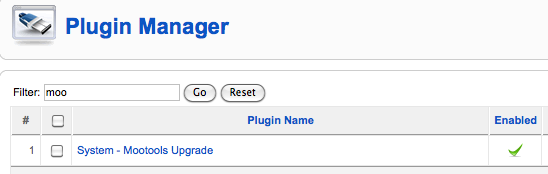
Since Joomla 1.5.19 mootools 1.2 is included but no enabled by default.
To include and use mootools 1.2 instead of 1.1 with this code:  JHTML::_(‘behavior.mootools’) ,
mootools need to be enabled in the plugin manager first.

I recently had to install a piece of new software on an older debian etch system.
Debian removed the distribution from its main update servers and aptitude or apt-get wouldn’t work anymore.

I could have upgraded the system to the latest debian stable version through an dist-upgrade.
But following the rule to never touch a running system I decided not to. It could have taken quite some time and possibly resulted in a crashed server.

Fortunately it is possible to still access old debian distribution files through the debian archive.

All that is required is to change the apt-sources file and replace lines like this one:

deb http://mirror.cc.columbia.edu/pub/linux/debian/debian/ etch main contrib

with

deb http://archive.debian.org/ etch main contrib

now the package manager will work again and you can safe yourself a dist upgrade for some quieter time.

When using Apache-SSL Certificates you typically have to create a password when initially setting up the certificates on your server.
Unfortunately after configuring apache to use the certificate it will promt you for the password each time it starts.
This means your webserver will not run if the system reboots automatically without you having to log in and start it with the password manually.

Luckily there is an easy way to remove the password from a ssl key.

Just find your key and use this command to create a new key without password:

sudo openssl rsa -in mysslkey.key -out mysslkeynopassword.key

Then change your apache configuration to use mysslkeynopassword.key instead of the one with password and apache will start automatically again.

Obviously there is a security risk involved. So make sure no evil gets access to your new mysslkeynopassword.key file.

Lets say you want to call a remote function with Flex’s RemoteObject and in the Response Handler you wish to access some of the variables you used in your calling function. You could use class variables so that they are available in your Response Handler. But thats not always the preferred way.

Another option that I like to use is to define the response handler in your calling Method as a closure. That way you will have access to all variables that are in the scope of the calling method in your handler function.

Here is an example on how to achieve this:

public function callRemoteMethod( myvar:String ):void {

myRemoteObject.myRemoteFunction( myvar ).addResponder(

new ItemResponder(

function(re:ResultEvent, a:AsyncToken ):void {

//the resonder has access to myar

trace(myvar ) ; trace(re.result) ;

},

function(f:FaultEvent, a:AsyncToken):void {

Alert.show(‘An Error occurred’) ;

}

)

) ;

}

In case you’re trying to make the hand cursor appear when hovering over a link and you had no success using cursor: hand, try this rule instead:

a { cursor: pointer ; }
This should work in all browsers.

Have you tried to create a paypal button and pass a return URL to paypal that includes some paramters and experienced that paypal will only return visitors to your main page, ignoring your GET parameters ?

something like:

<input type=”hidden” name=”return” value=”http://www.mypage.com/index.php?display=thankyou”>

will not work unless you also specify this parameter:

<input type=”hidden” name=”rm” value=”2″>

this will instruct paypal to post its own parameters as POST and keep your parameters as GET.

Or as explained in the Paypal documentation:

“a value of 2 means: the payer’s browser is redirected to the return URL by the POST method, and all transaction variables are also posted”

Hope this will help someone.

I created a simple Joomla! component. It’s purpose is to demonstrate how a Flex Application can be integrated into a component. The Flex Application is communicating with its Joomla! backend through AMFPHP. AMFPHP1.9 is included in this example setup.

You can download and install this component via the Joomla Administration Interface and link a menu item to it, to see it in action.

You can also download the source code for the simple Flex Application to see how it connects to the gateway.

download joomla component

download flex example source code


Here is a screenshot of the installed component:

  1. Go to the Apple Menu > System Preferences > Network
  2. Click the “+” symbol on the bottom left
  3. Under “Interface” choose “Bluetooth PAN“. Under “Service Name” put what ever you want. Click Create. Close the Network screen.
  4. Ensure Bluetooth tethering is On within your iPhone 3G/3GS and that Bluetooth is On within your Mac.
  5. Navigate to the Bluetooth menu item on the Apple Menu Bar and highlight your iPhone 3G/3GS and click “Connect to Network”.

It is not possible to use self closing div tags.
Browsers will interpret <div /> just as <div> , which will result in missing end tags.

So dont even think about something like:
<div style="clear: both;" />

Quite often Joomla views need information from more then one model. It is a bit unclear from the joomla documentation how to achieve this.

In a Joomla View Class, a call to:
$defaultModel = $this->getModel()
retrieves the associated default model instance. Joomla expects the model to have the same name as the view.

To retrieve another model instance it is possible to pass a model name as parameter:
$otherModel = $this->getModel('myothermodel')

But without additional instructions this will lead to an error because the view does not yet know about “myothermodel”. Before the above code will return a valid model, the view needs first to be informed about this model.

The only logical place to do this is in the controller class. Before instructing the controller to display the view in question, add the following lines:

$view = $this->getView('myview', 'html') ;
$view->setModel( $this->getModel( 'myothermodel' )) ;

replace “myview” and “myothermodel” with the appropriate names and now the view
should be able to retrieve a valid instance of “myothermodel”

one important thing to note:
I could only get it to work when the actual model filename is all lowercase.
E.g. MyModel.php could not be recognized by Joomla’s getModel method on my Linux system.
Only after changing the filename to mymodel.php is would work.

Get Adobe Flash playerPlugin by wpburn.com wordpress themes